Agentic TCAD Calibration: From the Paper to a Reproducible Open Demo
Paper: Agentic TCAD Calibration Workflow for Oxide Semiconductor Transistors (arXiv:2609.12184)
Demo Code: github.com/gyulab/agentic-TCAD-calibration-public
This work is a collaboration between Georgia Tech, Samsung Electronics, and NVIDIA.
An AI agent calibrates the TCAD model step by step: it reads the ID–VG residuals, changes one physical knob or adds new physics, and keeps a step only if the simulation converges and the fit improves. The video ends with the fixed model on held-out drain biases and channel length. Synthetic device data.
Disclaimer: This educational post and the demo are not affiliated with or endorsed by Synopsys, Inc. No Synopsys software, documentation, license, input deck, or proprietary example is distributed. The demo uses synthetic data and does not reproduce the paper’s measured-device or Sentaurus results.
Motivation: calibration is an inverse problem
TCAD calibration is essential for predictive modeling of emerging oxide-semiconductor transistors. It is also slow and expert dependent. Several physical models and parameter sets can reproduce the same measured transfer curve, so a good local fit does not identify the underlying device physics. An engineer therefore spends most of the time deciding what to try next: which parameter to move, how far, and when an extra physics model is justified.
Our paper turns these decisions into an explicit, auditable loop. Measurement–TCAD residuals and local sensitivity tests choose the next bounded update. An update is accepted only if the simulation converges and a fixed device objective improves. The point is to make each step of the calibration reviewable, so the final model can be trusted beyond the curve it was fitted to.
The workflow in the paper
The paper calibrates a fabricated bottom-gate In–W–O (BG-IWO) transistor with Synopsys Sentaurus. Three roles are kept separate:
| Role | Responsibility |
|---|---|
| LLM agent | Analyze residuals and device metrics, retrieve evidence (RAG), and propose a bounded TCAD update |
| TCAD simulator | Solve the device equations and return the transfer curve and convergence status |
| Human reviewer | Define the device stack and test splits, approve model changes, and check physical validity |
Each update is scored with a multi-metric objective J. J combines log- and linear-current errors with the errors in Vth (at 100 nA), log Ion, and subthreshold swing (SS). One-factor-at-a-time (OFAT) probes estimate the local sensitivity of each parameter group. A bounded, derivative-free Gauss–Newton (DFO-GN) step then proposes the change. An additional physics model, such as a fixed charge or a Gaussian/tail density of states, is considered only when a systematic residual persists after the existing parameters have been adjusted.
In the paper, five accepted updates reduce J from 2.589 to 0.181 (14.3×). The calibrated model is then held fixed. Maximum Vth/Ion errors are 36.1 mV/0.022 dec for varying drain bias and 46.2 mV/0.062 dec for varying channel length. These held-out tests are what separate a transferable model from a local curve fit.
Why an open demo
The paper’s results depend on measured device data, calibrated Sentaurus decks, and a commercial license. None of these can be shared. A reader who wants to see how the loop actually makes decisions would therefore have nothing to run.
The open demo keeps the workflow and replaces everything proprietary. A small analytic transistor model stands in for Sentaurus, and synthetic curves stand in for the measurement. The demo needs only Python with NumPy, SciPy, Matplotlib, and PyYAML, and it finishes in about 5 s on a laptop CPU. It demonstrates the decision logic, not the device physics of In–W–O.
A synthetic device with known missing physics
The simulator is a charge-based (EKV-style) transfer-curve model with a Schottky-like contact resistance solved self-consistently. It depends on gate voltage, drain bias, and channel length. That dependence matters, because a held-out test on a model that ignores L would be meaningless. The calibration parameters mirror the paper’s effective descriptors: S/D work function (contact), gate work function, mobility prefactor μ0, and two optional components, a gate-interface fixed charge Qf and a tail-state density Ntail.
The synthetic “measurement” is generated by the same model plus two effects that the calibration model never has: a gate-dependent mobility and a drain-induced threshold shift. Noise and a pA-level floor are added with a fixed seed. A perfect fit is therefore impossible by construction. This avoids the “inverse crime” of fitting data with the model that generated it, and it gives the held-out tests real model-form error to reveal.
Objective J and the accept rule
The demo uses the paper’s objective (Eq. 1) with the same weights and metric windows:
\[J=\frac{1}{|\mathcal{B}_{cal}|}\sum_{b\in\mathcal{B}_{cal}}\Big[0.25\,E_{\log,b}+0.10\,E_{\mathrm{lin},b}+1.00\,|\Delta V_{th,b}|+0.20\,|\Delta\log_{10}I_{on,b}|+0.25\,|\Delta SS_b|\Big]\]The calibration biases are VD = 0.05 and 1 V at L = 1 µm. The paper states that each term is normalized by a fixed factor but does not list the values. The demo therefore declares its own normalization in the config, so its J values cannot be compared with the paper’s.
The bounded update solves the paper’s Eq. (3): a weighted least-squares step inside the parameter box and a trust radius. The rule that follows is strict. A trial is accepted only if every calibration simulation converges and J decreases. Otherwise it is rejected, logged with its reason, and retried with a smaller step. This rule is what keeps an automated loop from drifting into a better-looking but unphysical fit.
Agent and optimizer are different things
The most important design choice is the split between choosing and computing. The planner only chooses among legal actions: update one parameter group, request a model activation, or stop. The numbers always come from the OFAT and Gauss–Newton tools, and the accept rule is enforced by the controller. A planner can therefore never bypass the bounds or the objective, however it is implemented.
The default planner is a deterministic, rule-based controller. It is not an LLM. It activates a component that addresses the dominant residual when one is eligible. Otherwise it updates the group with the largest predicted gain, and it stops when nothing legal remains. An optional LLM planner can be connected to any OpenAI-compatible endpoint. It receives the same observation as JSON and must return one legal action. Invalid output is logged as an error, and the run never silently falls back to the rule planner. The default path thus needs no API key, while a real LLM can be plugged in without changing the guard rails.
Every decision is written to an action log, one JSON line per event:
{"event": "trial", "group": "contact", "changes": {"phi_SD": {"from": 4.75, "to": 4.51}},
 "J_before": 13.61, "J_trial": 11.40, "decision": "accepted", "reason": "converged and J decreased"}
A reviewer can replay the whole calibration from this log and check why each step was taken.
Residual-guided model activation
Adding physics is the riskiest decision in calibration, because almost any extra term lowers the error. The demo therefore makes a component eligible only under three conditions. Its residual must carry at least 15% of J. It must persist through bounded parameter updates. And a trigger must show that existing parameters cannot remove it. Even then the activation needs an approval record, either from a policy file or from the researcher at the terminal.
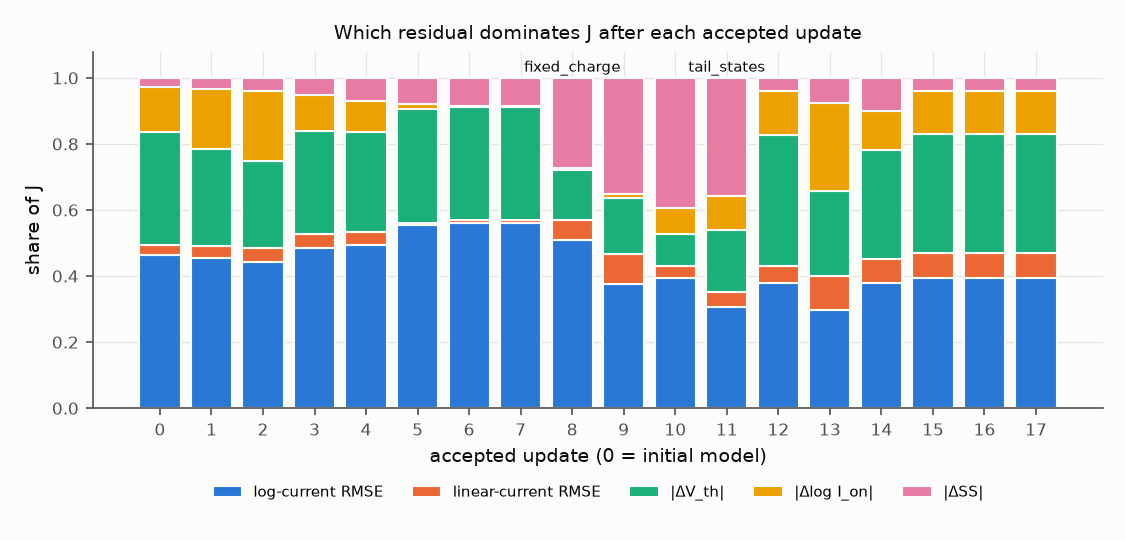
Two triggers appear in the default run. The gate work function reaches its approved bound while a Vth offset remains, so the workflow requests the fixed charge Qf. Later, the SS residual persists while no active parameter can move it to first order, so the workflow requests the tail-state term. Because both candidates share the synthetic truth’s functional forms, the meaningful check is the negative one. When the synthetic device lacks a component, the workflow does not activate it. This selectivity is tested directly, and it is the evidence that the gate is not trivially permissive.
Results on synthetic data
The run starts from a deliberately poor model with a high contact barrier, a Vth offset of about 0.7 V, and no tail states.
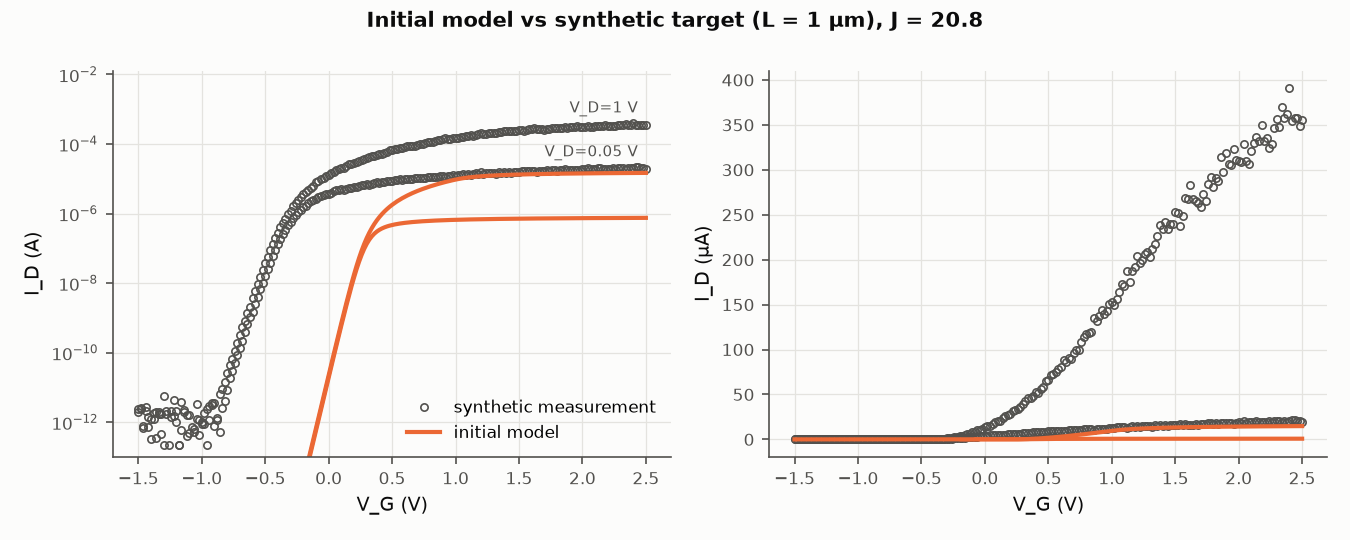
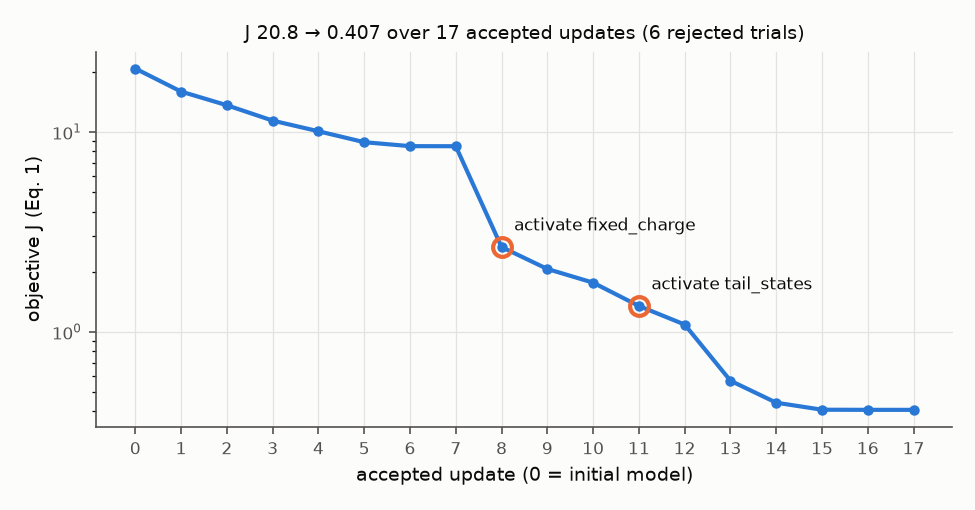
The workflow first moves the gate work function to its bound, then corrects the contact and mobility, and then activates Qf and the tail-state term when their residuals persist. J falls from 20.77 to 0.407 over 17 accepted updates, with 6 rejected trials. Parameter tuning alone stalls near J = 8.5. The largest single drop, from 8.49 to 2.66, comes with the fixed-charge activation. After the tail-state activation, J falls by another factor of four within four updates. The added terms therefore appear to remove systematic errors that the original parameters could not reach.
The residual breakdown explains each action. Once the Vth offset is corrected, the SS share of J grows from below 10% to about 40%. That persistent share is what triggers the tail-state activation. It falls to about 4% once the tail-state density has been adjusted.
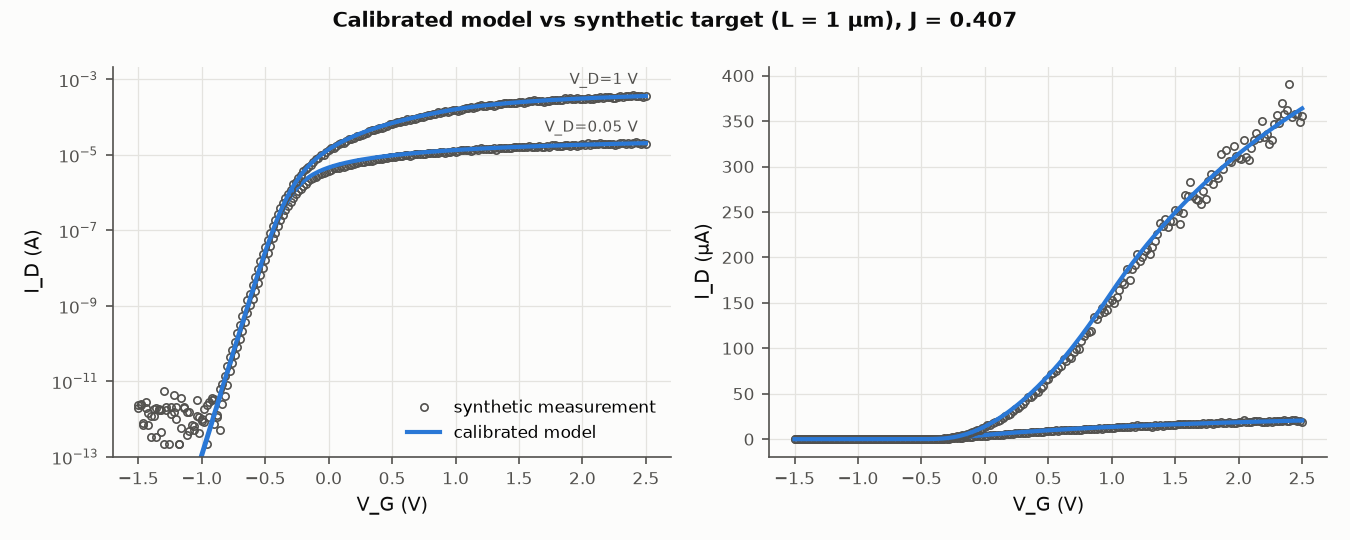
Not every parameter is identified. The gate work function and Qf enter only through VT, so only their combination is fixed by the data. μ0 also absorbs the gate-dependent mobility that the model lacks. The contact work function and the tail-state density are recovered closely. This mirrors the paper’s caution that fitted values are calibration-effective descriptors, not physical extractions.
Held-out evaluation without retuning
The calibrated model is then held fixed and evaluated on conditions it never saw: VD = 0.1, 0.2, and 0.5 V at L = 1 µm, and L = 2 µm at both calibration biases. A test confirms that corrupting the held-out data leaves the calibration unchanged.
| Condition | max |ΔVth| | max |Δlog Ion| |
|---|---|---|
| Calibration (L = 1 µm, VD = 0.05, 1 V) | 16.9 mV | 0.031 dec |
| Held-out drain bias (VD = 0.1–0.5 V) | 16.9 mV | 0.024 dec |
| Held-out channel length (L = 2 µm) | 17.0 mV | 0.021 dec |
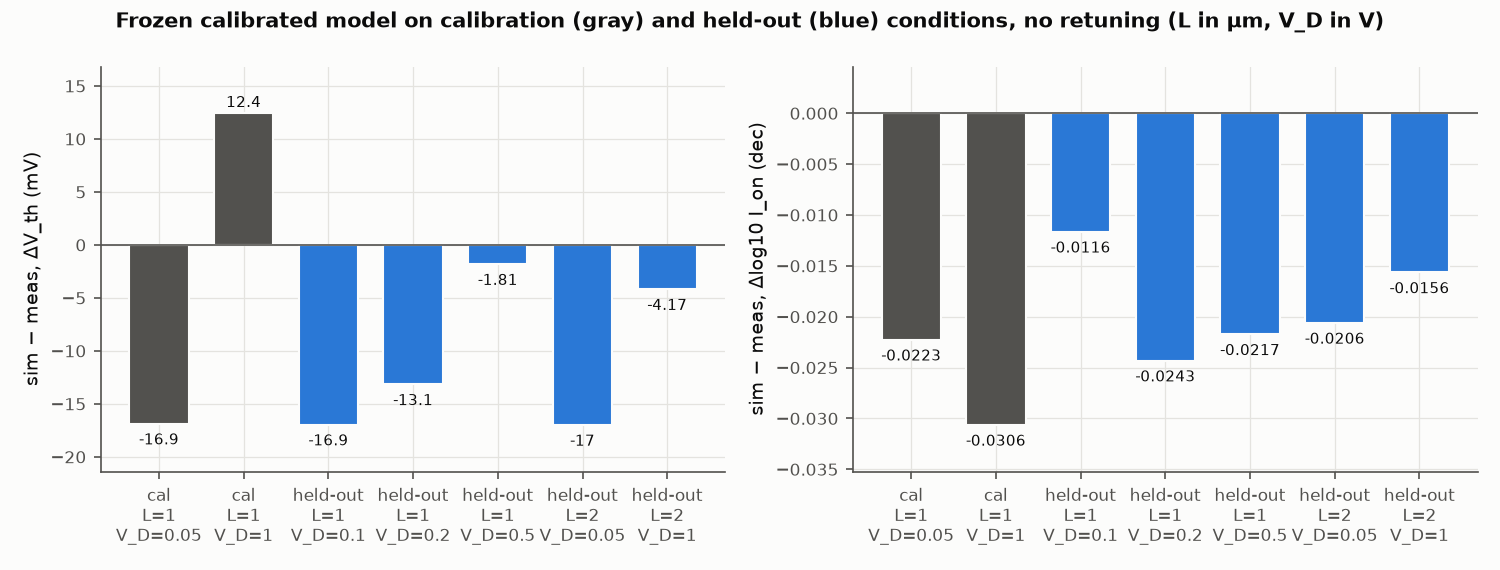
The remaining Vth errors are model-form error, not noise. They stay at 14–19 mV with the noise switched off, and they fall to about 3 mV when the missing physics is removed from the synthetic device. The held-out drain biases lie between the two calibration biases, so that test is an interpolation in VD, while the L = 2 µm test changes the geometry. Across ten noise seeds, final J ranges from 0.34 to 0.43 and the held-out Vth error from 17 to 23 mV, so the seed shown here is on the favorable side.
Run it yourself
git clone https://github.com/gyulab/agentic-TCAD-calibration-public
cd agentic-TCAD-calibration-public
python -m venv .venv && source .venv/bin/activate
pip install -r requirements-lock.txt && pip install -e . --no-deps
python -m agentic_tcad_demo run --config configs/synthetic_demo.yaml
pytest
The run writes the action log, a summary with the J trajectory and held-out tables, the final parameters, and the five figures above. Two runs give byte-identical outputs. --interactive asks the researcher before each model activation, and --planner llm connects an LLM through environment variables. A private simulator, such as an in-house TCAD wrapper, can be plugged in through a small Simulator interface without adding any deck or license file to the repository.
What the demo does not show
The demo has clear limits, and they are worth stating once. It does not implement RAG. Retrieval from the Sentaurus manual cannot be redistributed, so candidate components are listed in the config instead. The optional LLM planner has not yet been evaluated with a specific model. The compact model is a teaching instrument, so a good synthetic calibration says nothing about industrial TCAD accuracy. Finally, the paper’s numbers come from measured data and Sentaurus, and they cannot be reproduced without those assets.
Takeaway
An agentic calibration workflow is useful less for its speed than for its discipline. Residuals decide what to probe. Updates stay inside approved bounds. New physics needs evidence and approval, and every step must improve a fixed objective. Held-out conditions then test whether the model transfers. The open demo makes this discipline concrete enough to run, inspect, and test, and the same pattern would apply to other inverse problems with expensive simulators.
Related: An earlier practical guide on setting up coding agents for generic TCAD tasks (AGENTS.md, SKILL.md, local manual search, and execution gates) is available as a PDF.
Enjoy Reading This Article?
Here are some more articles you might like to read next: